
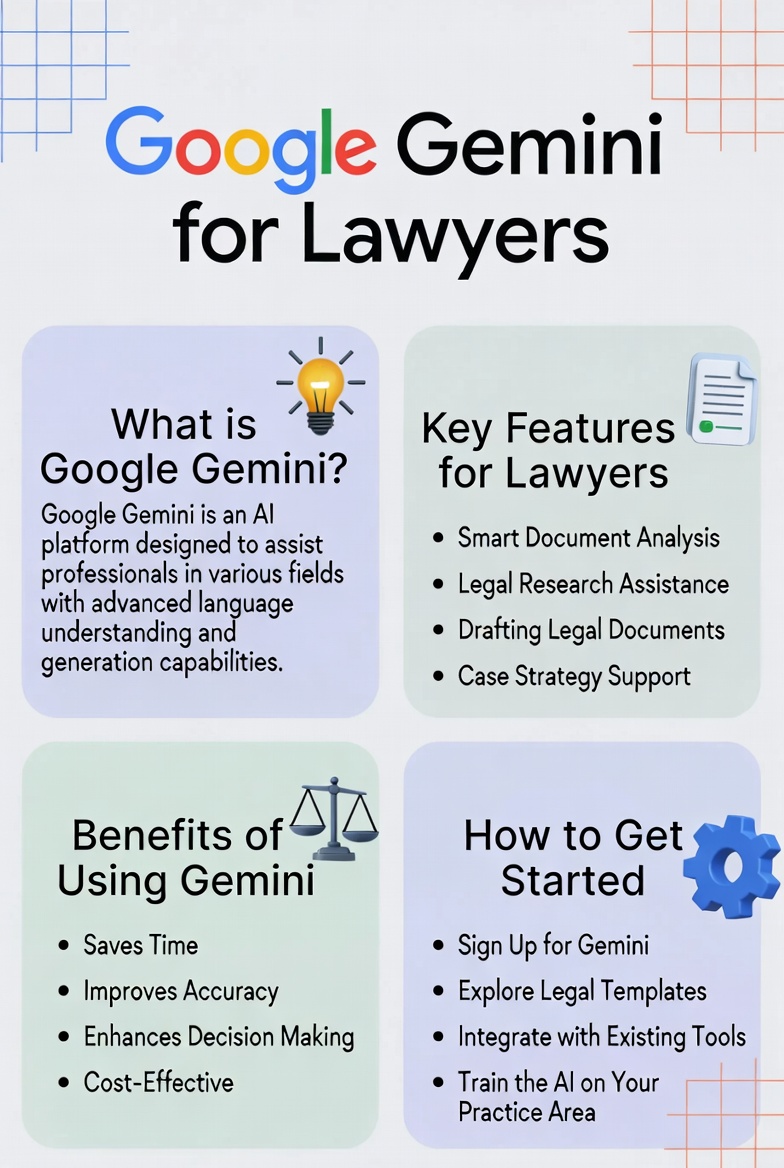

TL;DR
- Gemini’s biggest advantage for law firms is not the model itself. It is the fact that it lives inside Gmail, Docs, Drive, and Calendar, which is where most firms already work.
- Workspace versions of Gemini have enterprise data protections by default. Your prompts and content are not used to train Google’s models. That is a meaningfully different posture than the free consumer app when it comes to Gemini for lawyers.
- Gemini has been less consistent than Claude or ChatGPT on complex legal reasoning and long-form analysis. It is a strong drafter and summarizer, not a substitute for legal research.
- NotebookLM is the underrated piece. Drop case files into a notebook and Gemini will answer questions grounded in those documents with source citations.
- Most firms running Google Workspace are using less than 20% of what Gemini already gives them. That is the real opportunity, and it is mostly a workflow problem, not a software problem.
If your firm runs on Google Workspace, you already have Gemini. You may not be using it. You may not know what it does. But it is sitting inside every Gmail thread, every Doc, every Drive folder, and every Calendar invite, waiting for you to ask it something.
That is the entire pitch for Gemini for lawyers. It is not the smartest AI on the market, but it is the AI that is already in the place you work.
What Gemini actually is
Gemini is Google’s family of AI models. The current flagship as of 2026 is Gemini 3 Pro, with Gemini 2.5 Pro still widely deployed across Workspace. It handles text, images, audio, and video, with a context window large enough to ingest entire case files in a single session.
There are three different ways lawyers tend to encounter Gemini, and the distinctions matter.
The first is gemini.google.com, the free consumer app. This is the one to be careful with. Chats on the free consumer tier can be reviewed by humans and used to improve Google’s models. Do not put client information into it.
The second is Gemini inside Google Workspace. If your firm pays for Business Standard, Business Plus, or any Enterprise plan, Gemini is bundled in. Google rolled it into the base Workspace plans in 2025 and raised the per-seat price to absorb the cost. The data handling here is different. Google’s official policy is that your Workspace content and Gemini prompts are not used to train models, are not reviewed by humans, and stay inside your organization’s domain.
The third is the Gemini API and Vertex AI, which is what a developer or a marketing agency would use to build something on top of Gemini for your firm. Same enterprise data protections apply.
For a law firm, the question that matters is which of those three you are using. The answer should almost never be “the free consumer app for client work.”
Why Workspace integration is the real story
Most AI tools are a separate tab. You leave what you are doing, open ChatGPT or Claude, paste in your text, copy the answer back, and return to your work. That switching cost is small individually and enormous in aggregate.
Gemini inside Workspace removes the tab. It shows up where you already are.
Drafting in Docs
Open a Doc, click the Gemini icon, and ask it to draft a demand letter, a client update, a fee agreement, or a blog post. It pulls from the Doc you are in and from anything you give it access to. You can highlight a paragraph and ask it to tighten the language, change the tone, or rewrite for a specific audience.
The output quality is solid for routine drafting. Demand letter first drafts. Client status updates. Internal memos. Marketing copy. Anything where the underlying logic is more about structure and tone than novel legal analysis.
For complex legal reasoning, contract redlines, or anything that needs to cite cases accurately, you still want to verify everything. Gemini hallucinates less than it used to, but it is not the most cautious model on the market. Claude tends to be more reliable for high-stakes drafting where precision matters more than speed.
Summarizing email in Gmail
This is probably the highest-immediate-value use case for partners and managing attorneys. Gemini will summarize a long email thread in a sidebar, surface the actual decision points, and let you ask follow-up questions without scrolling through six weeks of replies.
It will also draft replies. The “Help me write” prompt inside Gmail works well for routine responses. Client check-ins. Scheduling. Internal coordination. Save the manual drafting for the email that actually needs your voice.
Caveat. Gemini cannot summarize encrypted or end-to-end secure messages, and it follows whatever data residency and DLP rules your Workspace admin has set. If your firm has strict retention or privilege protocols around email, talk to whoever administers your Workspace before turning every feature on.
Searching across Drive
Ask Gemini “what did we send the Henderson family last March about the settlement structure?” and it will find the document, summarize the relevant section, and link you to the source. This is the kind of thing paralegals burn hours on.
It works across Docs, Sheets, Slides, and PDFs in your Drive. The bigger and better-organized your Drive is, the more useful this gets. If your firm’s Drive is a swamp of “Final_v2_FINAL_use_this_one.docx” files, Gemini will surface that mess back to you. It is not magic. It is a search engine that can read.
Calendar and scheduling
Less exciting, more practical. Gemini in Calendar can draft meeting agendas from email threads, summarize what was discussed in a recurring matter, and help triage your week. It is not going to replace a legal assistant. It will make a lawyer without an assistant marginally more efficient.
NotebookLM is the part most lawyers miss
NotebookLM is a separate Google product that uses Gemini under the hood, and it is the most useful piece of the Google AI stack for lawyers that almost nobody talks about.
Here is the workflow. You create a notebook, upload sources (which can be PDFs, Google Docs, web URLs, audio files, YouTube videos, or pasted text), then you ask questions, and the model answers using only the sources you uploaded, with citations back to the specific passage.
For a law firm, that means:
- Drop the full set of case documents into a notebook and ask “what are the strongest facts for our motion to dismiss?”
- Upload deposition transcripts and ask “what did the defendant say about the timeline of events?”
- Load expert reports and ask “what assumptions is the opposing expert making that we should challenge?”
- Pull in years of practice area research and ask it questions you cannot remember the answer to.
The output is grounded in the documents you provided. It will tell you exactly which page and which sentence it pulled from. That is dramatically more useful for legal work than a model that might be guessing from its training data.
NotebookLM is available in a free version and in a Plus version inside Google Workspace plans. For most firms it is the single highest-leverage piece of the Gemini ecosystem.
Where Gemini falls short for legal work
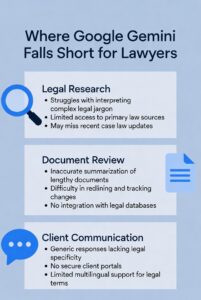
Complex legal reasoning is not its strongest area.
Gemini has improved a lot, and Gemini 3 Pro is genuinely competitive on benchmarks. But for tasks that involve weighing legal arguments, predicting how a court would rule, or analyzing nuanced contract terms, it has historically been less consistent than Claude or ChatGPT. It tends to give you a confident answer where Claude would tell you the answer is unclear. That is the wrong tradeoff for legal work.
Citation accuracy still needs verification.
Gemini will cite cases. Some of those cases will be real. Some will not. This is true of every general purpose AI model, including the ones marketed as more cautious. Never file anything Gemini wrote without checking every citation in Westlaw, Lexis, or Fastcase. The lawyers who got sanctioned for fake citations were not all using ChatGPT. The problem is general, and the verification step is non-negotiable.
The free consumer app has different data handling than Workspace.
This trips up firms. A lawyer pastes a client’s medical records into gemini.google.com because it is fast, and now that content has potentially been reviewed by humans and used for model improvement. The Workspace version is safe by default. The free app is not. Train your team on which version they are using before they touch client data.
It is not a legal research tool.
Gemini does not have privileged access to Westlaw or Lexis. It cannot do shepardizing. It does not know which cases have been overruled in your jurisdiction. For actual legal research, use the tools built for it. Use Gemini for drafting, summarizing, and synthesizing once you have the underlying research.
How Gemini for lawyers stacks up against ChatGPT and Claude
Pick Gemini if your firm lives in Google Workspace.
The integration value is real and most firms underuse it. The data handling for Workspace plans is enterprise-grade. NotebookLM is genuinely useful for case file analysis.
Pick Claude for high-stakes drafting and analysis.
It is more conservative, more accurate, and more transparent about its uncertainty. Better for contract review, brief drafting, and any output where you need careful, structured legal language.
Pick ChatGPT for breadth and creative work.
Largest ecosystem, most third-party integrations, strongest for brainstorming, content marketing, and conversational tasks.
In practice, the best-equipped firms use more than one. Gemini for the workflow integrations. Claude for the careful work. ChatGPT for the wide-net creative tasks. They are not competing for the same job.
Pricing for Gemini in a law firm
Three layers, three price points.
Free. gemini.google.com gives you basic access to Gemini 3 Flash and limited Gemini 3 Pro queries. Use it to test prompts. Do not use it for client matters.
Google AI Pro. $19.99 per month, individual subscription. Higher limits, full access to Gemini 3 Pro, NotebookLM Plus, video generation, and more. This is the equivalent of ChatGPT Plus or Claude Pro and is a fine starting point for a solo attorney exploring the tool on personal documents and marketing work.
Google Workspace with Gemini built in. As of 2026, Gemini is bundled into Business Standard ($14 per user per month), Business Plus ($22 per user per month), and Enterprise plans. If your firm already pays for Workspace, you already have it. Check your admin console, turn it on for your team, and start training people on how to use it.
For most small and mid-sized firms, the right move is to use what is already included in your Workspace subscription. The marginal cost of “adding Gemini” for a firm already on Business Standard is zero. The cost is the time to actually learn it.
The implementation gap
Gemini being included in Workspace does not mean your firm is using it. In my experience, most firms are running at well under 20% of what Gemini Workspace can do.
That is a workflow problem.
Most firms turn the AI features on, send a single staff email saying “we have AI now,” and then move on. Six months later, the partners have used it twice, the associates have used it for casual drafting, the paralegals are still doing things by hand, and nobody is using NotebookLM at all. The license is paid. The value is not captured.
What actually works is the boring version. Identify the three or four workflows in your firm where Gemini would save the most time. Build prompts for those specific workflows. Train your team on those prompts. Measure whether they are using them. Iterate.
The firms doing this well are saving meaningful hours per week per person. The firms not doing it are paying for software they are not using.
How to start using Gemini for lawyers at your firm this week
A practical sequence, in order of effort.
- Confirm which Workspace plan your firm has. If it is Business Standard or higher, you already have Gemini included.
- Talk to whoever administers your Workspace. Make sure Gemini is turned on for the right users, and confirm your DLP and data residency settings.
- Pick one workflow and run it through Gemini for a week. Recommended first try: have your team use Gemini in Gmail to summarize and draft routine emails. Lowest stakes, highest visibility.
- Set up a NotebookLM for an active matter. Upload the case file, the key documents, and the deposition transcripts. Use it during prep for a hearing or a client meeting and see how it lands.
- Build a small library of saved prompts your team can reuse for the work you do most. Demand letters. Client intake follow-ups. Marketing post drafts. Status updates.
- Train. Set aside an hour every two weeks for the team to share what is working, what is not, and what they want to try next.
This is the same playbook for any AI tool. The work is in the implementation, not the technology.
Parting Thoughts On Gemini For Lawyers
Gemini for lawyers is not the smartest model on the market and is not the best for high-stakes drafting. What it is, if your firm is on Google Workspace, is the AI that already lives where your work happens.
That has real value. Emails get summarized in the same window you read them. Docs get drafted with Gemini sitting in the sidebar. Case files get loaded into NotebookLM and answer questions with citations. None of it requires a new tab, a new login, or a new subscription if you are already paying for Workspace.
The catch is that “we have it” and “we use it” are not the same thing. The firms that win with Gemini are the ones that pick specific workflows, build prompts for them, and train their teams to actually use them.
If your firm wants help thinking through where Gemini fits, what to use it for, and what to keep doing the old way, that is the kind of work we do at Lawyers Marketer. We help law firms get real value out of AI without putting client confidentiality at risk or rolling out tools that nobody actually uses.
The tools are getting better fast. The firms that build the workflow now will be the ones that compound the advantage.